Body Doubling Online Free: Virtual Coworking, No Camera
Body doubling online free, with no camera, is a smaller corner of the virtual coworking market than the listicles suggest — most "free" alternatives still require video, and most camera-free options bury that detail three scrolls down. You opened Focusmate, saw the partner request, and closed it again. Or you joined a Zoom coworking room, kept the camera off the whole hour, and felt slightly guilty about it. The mechanism — working alongside someone else to make a task easier — works. The video part doesn't.
That's not a willpower problem. It's a format mismatch. For a large slice of the body doubling audience — people with camera anxiety, Zoom fatigue, rejection sensitive dysphoria, or just a face that doesn't want to be on screen at 9am — the camera adds enough friction that the focus benefit gets eaten up paying for it.
This post explains why camera-free body doubling works, what replaces video as the presence signal, and seven concrete ways to body double online without a camera — most of them free.
Why Video-Required Body Doubling Fails for Half the Audience
Camera-on body doubling assumes seeing a face is what makes presence work. Research on Zoom fatigue says the opposite for many people. A PMC review of video conferencing fatigue found that 49% of Americans report video calls more exhausting than in-person interaction, and that frequent users hit fatigue rates of 26%. The energy cost of being watched cancels the energy gain of presence.
The mechanism is well-documented. Self-view creates "mirror anxiety" — a constant low-grade self-monitoring loop. Reduced mobility (sitting still in the camera frame) prevents the natural body movement that helps regulate attention. Hyper-gaze (every face staring directly at you) triggers the same threat response as an in-person stare-down, except for 50 minutes straight. Cognitive load doubles because your brain is rendering social cues from a flat low-resolution feed.
For people with ADHD, the cost is sharper. Rejection sensitive dysphoria — a common ADHD comorbidity — turns being visually monitored into a performance situation. The body double stops being a calm anchor and becomes an audience.
Citation capsule: A 2021 PMC review of Zoom fatigue identified five root causes: mirror anxiety from self-view, restricted physical movement, hyper-gaze from grids of faces, cognitive load from rendering low-resolution social cues, and the simple cost of being visually monitored for sustained periods. 49% of Americans report video calls more exhausting than in-person equivalents.
Camera-free body doubling preserves the focus mechanism — knowing another person is present and working — and strips out the part that drains the audience it's meant to help.
What Replaces Video as the Presence Signal?
The presence signal in body doubling is not the face. It's the verified knowledge that another human is right now working on their own task. Video is one way to deliver that signal. There are others, and several of them work better.
Text status. A 2-word note like "writing report" or "fixing bug" tells you what your room-mates are doing without showing their face. Updated when they switch tasks, it carries more information than a video feed (you actually know what they're doing) at a fraction of the cognitive cost.
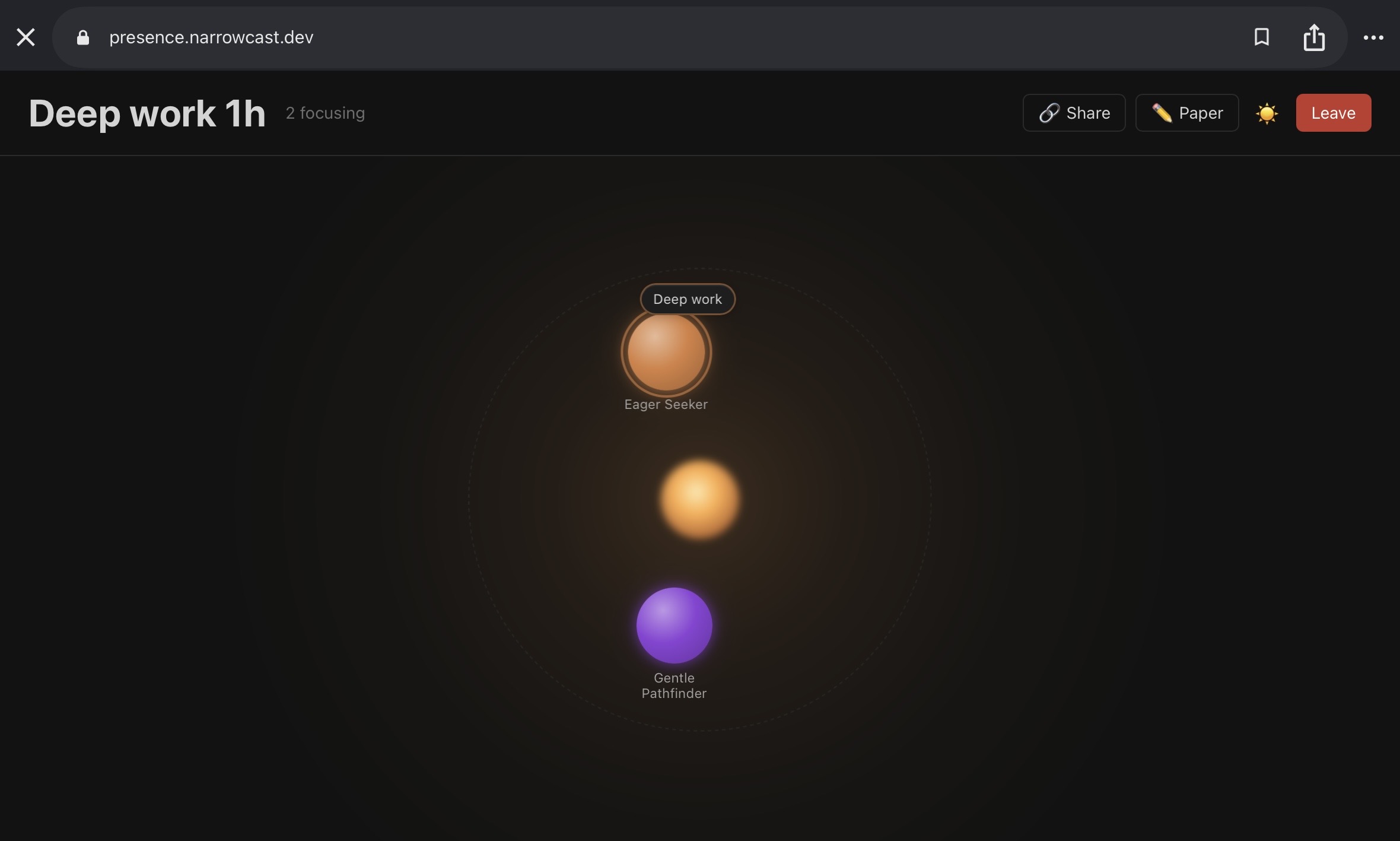
Ambient animations. Breathing bubbles, pulsing dots, drifting shapes — visual indicators that sync to other users' presence without rendering them as people. The brain reads "someone is here" without rendering "someone is watching me."
Audio-only. Voice channels (Discord), audio rooms, music-with-others apps. You hear keystrokes, occasional coughs, the texture of a working environment. Presence is real but invisible.
Active timer + check-in. A shared countdown plus a one-line goal at start and a one-line result at end. The session structure does the work the video used to do — declaring intent + having a finite container.
Activity indicators. "5 people focusing right now" on a public counter, a green dot on a presence list, a session log showing recent finishes. Aggregate presence — not a specific person you're looking at, but a verified collective working alongside you.
Each of these signals knowing-someone-else-is-here without requiring you to be watched back. That's the only thing body doubling actually needs.
7 Ways to Body Double Online Without a Camera
These options range from completely free to a few dollars a month. Picking is mostly about which interface fits your nervous system, not which is "best."
1. presence. Drop-in focus rooms with breathing bubbles and 2-word status. No video, ever. No accounts required to start. Built specifically for the camera-free use case — not "camera-optional," which usually means "everyone else has theirs on."
2. BuckleTime. Themed focus rooms (Coding, Writing, Studying) with a gamified streak system. Camera-free by design. Free tier covers regular use.
3. bodydoubling.space. Free for 8 hours daily. Camera and microphone both optional. Browser-only, works on phones. No installs.
4. Discord body doubling servers. Several public servers (search "ADHD body doubling Discord") run audio-only voice channels where you join muted and work in shared silence. Free. Lower polish than purpose-built apps, but the audio presence is genuine.
5. dubbii. Audio-only paired sessions, around $3.33/month. Cheaper than Focusmate, no video. Useful if you specifically want a 1:1 partner without the camera requirement.
6. Flow Club chat-only sessions. Flow Club's video sessions are not for you, but it runs designated chat-only and camera-off sessions for camera-shy users. Filter by those when booking.
7. "Study with me" livestreams (YouTube, TikTok). One-directional — you see them, they don't see you. Lowest commitment, available 24/7, completely free. Lacks the accountability loop of two-way presence, but works well as ambient background.
For a side-by-side comparison filtered to camera-free options, see Focusmate Alternatives Without Video. For the full overview of the practice itself, see the body doubling pillar guide.
How to Pick a Virtual Coworking Room With No Camera
Different camera-free formats solve different problems. Match the format to what's actually blocking your focus.
Drop-in vs scheduled. If your schedule is irregular or you focus in bursts, drop-in rooms (presence, BuckleTime, bodydoubling.space) remove the friction of booking. If you need an external deadline to start, scheduled 1:1 (dubbii) gives you that.
Solo room vs shared room. Solo with a "study with me" livestream is the lowest social cost. Shared rooms with text status give you actual peer presence. Audio rooms are the highest presence density without video — and the most stimulating, which suits some people and overwhelms others.
Free vs paid. presence, BuckleTime, bodydoubling.space, Discord, and YouTube livestreams cover most use cases for $0. Paid only matters if you specifically want 1:1 audio pairing (dubbii) or facilitated sessions (Flow Club chat-only).
Anonymity vs community. Some camera-free apps still surface usernames, profile photos, and session history — which recreates a softer version of the social monitoring loop. Fully anonymous drop-in (presence's model) is the lowest-stakes entry point.
Tips for Camera-Free Body Doubling Sessions
Camera-free body doubling needs slightly different habits than video-based sessions. The signals that hold a session together — start commitment, end commitment, presence verification — have to be deliberate, since they don't come from looking at faces.
Write your task as your status. Even if the app doesn't require it, type it. "drafting email to landlord" is a different commitment than "working." The act of putting it in text is the body double half of the session.
Use a visible timer. Without a video session's scheduled end, time blindness creeps in fast. Set a 25, 50, or 90-minute timer where you can see it. End cleanly.
Don't multitask the room. Camera-free rooms have a tab-in-the-background failure mode. The app is open but you're scrolling Reddit in another tab. The body double effect collapses the moment you stop holding yourself accountable to the room. Treat the focus tab the same way you'd treat a Zoom you couldn't leave.
Respect the silence. Audio rooms and Discord channels work because they're working environments. Side chat in body doubling rooms is the equivalent of talking through a movie. Save it for the after-session check-in.
Try multiple formats. What works for you specifically — text status, audio, ambient animation, livestream — is mostly trial and error across two or three weeks. Pick one for a week, switch, pick again.
Frequently Asked Questions
- Does body doubling actually work without video?
- Yes. The mechanism is social facilitation — knowing another person is present and working — not visual monitoring. Text status, audio presence, ambient animation, and active session timers all deliver the same signal. For people with Zoom fatigue or camera anxiety, camera-free body doubling often works better than video-based versions because the cost of being watched is removed. See What Replaces Video.
- What's the best free body doubling app without a camera?
- presence, BuckleTime, and bodydoubling.space all offer free camera-free body doubling with no signup friction. presence and BuckleTime are camera-free by design rather than camera-optional, which means the rooms are actually camera-free instead of "video off while everyone else has theirs on."
- Can I use Focusmate without a camera?
- No. Focusmate requires both partners to be on camera throughout the session — it's a hard requirement, not a preference. If you want the Focusmate format (timed, 1:1 partner) without video, dubbii is the closest match. For drop-in rooms with no partner matching, presence or BuckleTime are better fits.
- Is camera-free better for ADHD?
- For many people with ADHD, yes. Rejection sensitive dysphoria and camera anxiety are common ADHD comorbidities. Being visually monitored turns a body double into an audience, which triggers performance self-consciousness and undermines focus. Removing the camera keeps the presence benefit without the cost. Individual responses vary — some ADHD users prefer the accountability of video. Trial and error across a few formats is the only way to know.
The point of body doubling is presence, not performance. If video is the part that drains you, the body doubling itself is not broken — the format is. Camera-free options preserve the focus mechanism and strip out the cost.